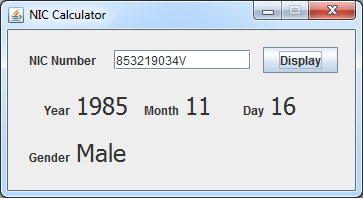
ජාව වලින් ජාතික හැඳුනුම්පත් අංකයෙන් උපන්දිනය හොයමු

import javax.swing.JOptionPane;
public class frmMain extends javax.swing.JFrame {

    public frmMain() {
        initComponents();
    }


    @SuppressWarnings("unchecked")
    // //GEN-BEGIN:initComponents
    private void initComponents() {

        jLabel1 = new javax.swing.JLabel();
        jTextField1 = new javax.swing.JTextField();
        jButton1 = new javax.swing.JButton();
        lblY = new javax.swing.JLabel();
        lblM = new javax.swing.JLabel();
        lblD = new javax.swing.JLabel();
        jLabel2 = new javax.swing.JLabel();
        jLabel3 = new javax.swing.JLabel();
        jLabel4 = new javax.swing.JLabel();
        lblG = new javax.swing.JLabel();
        jLabel5 = new javax.swing.JLabel();

        setDefaultCloseOperation(javax.swing.WindowConstants.EXIT_ON_CLOSE);
        setTitle("NIC Calculator");
        setResizable(false);
        addWindowListener(new java.awt.event.WindowAdapter() {
            public void windowOpened(java.awt.event.WindowEvent evt) {
                formWindowOpened(evt);
            }
        });

        jLabel1.setText("NIC Number");

        jButton1.setText("Display");
        jButton1.addActionListener(new java.awt.event.ActionListener() {
            public void actionPerformed(java.awt.event.ActionEvent evt) {
                jButton1ActionPerformed(evt);
            }
        });

        lblY.setFont(new java.awt.Font("Tahoma", 0, 24)); // NOI18N
        lblY.setText("YYYY");

        lblM.setFont(new java.awt.Font("Tahoma", 0, 24)); // NOI18N
        lblM.setText("MM");

        lblD.setFont(new java.awt.Font("Tahoma", 0, 24)); // NOI18N
        lblD.setText("DD");

        jLabel2.setText("Year");

        jLabel3.setText("Month");

        jLabel4.setText("Day");

        lblG.setFont(new java.awt.Font("Tahoma", 0, 24)); // NOI18N
        lblG.setText("Gender");

        jLabel5.setText("Gender");

        javax.swing.GroupLayout layout = new javax.swing.GroupLayout(getContentPane());
        getContentPane().setLayout(layout);
        layout.setHorizontalGroup(
            layout.createParallelGroup(javax.swing.GroupLayout.Alignment.LEADING)
            .addGroup(layout.createSequentialGroup()
                .addGap(21, 21, 21)
                .addGroup(layout.createParallelGroup(javax.swing.GroupLayout.Alignment.LEADING)
                    .addGroup(layout.createSequentialGroup()
                        .addComponent(jLabel1)
                        .addGap(18, 18, 18)
                        .addComponent(jTextField1, javax.swing.GroupLayout.PREFERRED_SIZE, 137, javax.swing.GroupLayout.PREFERRED_SIZE)
                        .addPreferredGap(javax.swing.LayoutStyle.ComponentPlacement.UNRELATED)
                        .addComponent(jButton1))
                    .addGroup(layout.createSequentialGroup()
                        .addGroup(layout.createParallelGroup(javax.swing.GroupLayout.Alignment.TRAILING)
                            .addComponent(jLabel2)
                            .addComponent(jLabel5))
                        .addPreferredGap(javax.swing.LayoutStyle.ComponentPlacement.RELATED)
                        .addGroup(layout.createParallelGroup(javax.swing.GroupLayout.Alignment.LEADING)
                            .addGroup(layout.createSequentialGroup()
                                .addComponent(lblY, javax.swing.GroupLayout.PREFERRED_SIZE, 62, javax.swing.GroupLayout.PREFERRED_SIZE)
                                .addPreferredGap(javax.swing.LayoutStyle.ComponentPlacement.RELATED)
                                .addComponent(jLabel3)
                                .addPreferredGap(javax.swing.LayoutStyle.ComponentPlacement.RELATED)
                                .addComponent(lblM, javax.swing.GroupLayout.PREFERRED_SIZE, 46, javax.swing.GroupLayout.PREFERRED_SIZE)
                                .addPreferredGap(javax.swing.LayoutStyle.ComponentPlacement.UNRELATED)
                                .addComponent(jLabel4)
                                .addPreferredGap(javax.swing.LayoutStyle.ComponentPlacement.RELATED)
                                .addComponent(lblD, javax.swing.GroupLayout.PREFERRED_SIZE, 42, javax.swing.GroupLayout.PREFERRED_SIZE))
                            .addComponent(lblG, javax.swing.GroupLayout.PREFERRED_SIZE, 85, javax.swing.GroupLayout.PREFERRED_SIZE))))
                .addContainerGap(17, Short.MAX_VALUE))
        );
        layout.setVerticalGroup(
            layout.createParallelGroup(javax.swing.GroupLayout.Alignment.LEADING)
            .addGroup(layout.createSequentialGroup()
                .addGap(17, 17, 17)
                .addGroup(layout.createParallelGroup(javax.swing.GroupLayout.Alignment.BASELINE)
                    .addComponent(jLabel1)
                    .addComponent(jTextField1, javax.swing.GroupLayout.PREFERRED_SIZE, javax.swing.GroupLayout.DEFAULT_SIZE, javax.swing.GroupLayout.PREFERRED_SIZE)
                    .addComponent(jButton1))
                .addGap(18, 18, 18)
                .addGroup(layout.createParallelGroup(javax.swing.GroupLayout.Alignment.BASELINE)
                    .addComponent(lblY)
                    .addComponent(lblM)
                    .addComponent(lblD)
                    .addComponent(jLabel2)
                    .addComponent(jLabel3)
                    .addComponent(jLabel4))
                .addGap(18, 18, 18)
                .addGroup(layout.createParallelGroup(javax.swing.GroupLayout.Alignment.BASELINE)
                    .addComponent(lblG)
                    .addComponent(jLabel5))
                .addContainerGap(23, Short.MAX_VALUE))
        );

        pack();
    }// //GEN-END:initComponents

    private void jButton1ActionPerformed(java.awt.event.ActionEvent evt) {//GEN-FIRST:event_jButton1ActionPerformed
        // TODO add your handling code here:
        //jTextField1.setText("852512393V");

        if(jTextField1.getText().length() == 10){
            String sNIC = jTextField1.getText();
            //if(Integer.parseInt(sNIC)>0){
                String sYear = "19" + sNIC.substring(0,2);
                int iNum =Integer.parseInt(sNIC.substring(2,5));

                if(iNum < 500){
                    lblG.setText("Male");
                }else{
                    lblG.setText("Female");
                    iNum = iNum -500;
                }

                int iMonth =0;
                int iDay =0;

                    if(iNum<= 31){//1 - 31
                            iMonth=1;
                            iDay=iNum;
                    }else if(iNum<= 60){//2 - 29
                            iMonth=2;
                            iDay=iNum-31;
                    }else if(iNum<= 91){//3 - 31
                            iMonth=3;
                            iDay=iNum-60;
                    }else if(iNum<= 121){//4 - 30
                            iMonth=4;
                            iDay=iNum-91;
                    }else if(iNum<= 152){//5 - 31
                            iMonth=5;
                            iDay=iNum-121;
                    }else if(iNum<= 182){//6 - 30
                            iMonth=6;
                            iDay=iNum-152;
                    }else if(iNum<= 213){//7 - 31
                            iMonth=7;
                            iDay=iNum-182;
                    }else if(iNum<= 244){//8 - 31
                            iMonth=8;
                            iDay=iNum-213;
                    }else if(iNum<= 274){//9 - 30
                            iMonth=9;
                            iDay=iNum-244;
                    }else if(iNum<= 305){//10 - 31
                            iMonth=10;
                            iDay=iNum-274;
                    }else if(iNum<= 335){//11 - 30
                            iMonth=11;
                            iDay=iNum-305;
                    }else if(iNum<= 366){//12 - 31
                            iMonth=12;
                            iDay=iNum-335;
                    }

                lblY.setText(sYear);
                lblM.setText(Integer.toString(iMonth));
                lblD.setText(Integer.toString(iDay));
            //}else{
            //   JOptionPane.showMessageDialog (null, "Invalid NIC Number", "NIC Calculator", JOptionPane.INFORMATION_MESSAGE );
            //}
        } else {
            //Message Box
            JOptionPane.showMessageDialog (null, "Please Enter NIC Number OR Invalid NIC Number", "NIC Calculator", JOptionPane.INFORMATION_MESSAGE );
        }


    }//GEN-LAST:event_jButton1ActionPerformed

    private void formWindowOpened(java.awt.event.WindowEvent evt) {//GEN-FIRST:event_formWindowOpened
        // TODO add your handling code here:
            lblY.setText("");
            lblM.setText("");
            lblD.setText("");
            lblG.setText("");
            jTextField1.requestFocus();
    }//GEN-LAST:event_formWindowOpened

    /**
     * @param args the command line arguments
     */
    public static void main(String args[]) {
        /* Set the Nimbus look and feel */
        //
        /* If Nimbus (introduced in Java SE 6) is not available, stay with the default look and feel.
         * For details see http://download.oracle.com/javase/tutorial/uiswing/lookandfeel/plaf.html
         */
        try {
            for (javax.swing.UIManager.LookAndFeelInfo info : javax.swing.UIManager.getInstalledLookAndFeels()) {
                if ("Nimbus".equals(info.getName())) {
                    javax.swing.UIManager.setLookAndFeel(info.getClassName());
                    break;
                }
            }
        } catch (ClassNotFoundException ex) {
            java.util.logging.Logger.getLogger(frmMain.class.getName()).log(java.util.logging.Level.SEVERE, null, ex);
        } catch (InstantiationException ex) {
            java.util.logging.Logger.getLogger(frmMain.class.getName()).log(java.util.logging.Level.SEVERE, null, ex);
        } catch (IllegalAccessException ex) {
            java.util.logging.Logger.getLogger(frmMain.class.getName()).log(java.util.logging.Level.SEVERE, null, ex);
        } catch (javax.swing.UnsupportedLookAndFeelException ex) {
            java.util.logging.Logger.getLogger(frmMain.class.getName()).log(java.util.logging.Level.SEVERE, null, ex);
        }
        //

        /* Create and display the form */
        java.awt.EventQueue.invokeLater(new Runnable() {
            public void run() {
                new frmMain().setVisible(true);
            }
        });
    }


    // Variables declaration - do not modify//GEN-BEGIN:variables
    private javax.swing.JButton jButton1;
    private javax.swing.JLabel jLabel1;
    private javax.swing.JLabel jLabel2;
    private javax.swing.JLabel jLabel3;
    private javax.swing.JLabel jLabel4;
    private javax.swing.JLabel jLabel5;
    private javax.swing.JTextField jTextField1;
    private javax.swing.JLabel lblD;
    private javax.swing.JLabel lblG;
    private javax.swing.JLabel lblM;
    private javax.swing.JLabel lblY;
    // End of variables declaration//GEN-END:variables
}
ඔයාල මෙකෙන් වැඩක් අරගත්තොත් Comment දාන්න අමතක කරන්න එපා OK..
ඉස්සරහට තව තව කෝඩ් දෙන්නම්.......